GalleryID Desktop · Mac and Windows
Captioned. Confirmed. Before deadline.
Start with a roster.Accelerate with headshots.
Load a roster and one press writes the athlete name and the full caption line to the file. That is CaptionID, and it needs no headshots at all. Add headshots and MatchID starts finding the athletes for you, with anything it isn’t sure about waiting for your click instead of being guessed at.
macOS 12+ · Windows 10/11 · Everything runs local · 14-day free trial, card required · Already subscribed? Download the app
One job shouldn’t take five tools.
You covered the game. Then the job splinters: one app to cull, another to tag, a code file you maintain by hand, an editor, an FTP client. We’re photographers, and we were tired of conforming to that stack, so we rebuilt the workflow itself.
Shortcodes, buttons, or MatchID. Caption the way you already work.
Three steps. Everything else is configuration.
The whole path from captured to named, delivered files, on your own computer.
Select the folder
Fast ingest with token rename and folder patterns. Profiles save the whole configuration, so the next event is one click. Photos load as they copy, which means you can start tagging your protected frames while the rest of the card is still coming across.
Photos never leave the computer.
Caption the players, your way
One press from the folder’s roster writes the name and the full caption line, and codes work if you prefer keystrokes. Index headshots and MatchID starts filling in names for you, with uncertain matches waiting in the review queue. Not sure who someone is? Ask Who Is This.
By hand or by MatchID. Same named file.
Send the named files
FTP destinations with watermarking, or ZIP export with sidecars. Send files however you already do: upload to your own gallery, hand off a drive, deliver to the wire. Output sharpening is picked at delivery, after the resize and before any watermark.
Names write to the file.
Camera to phone to the wire. No laptop.
The GalleryID Desktop app for iPhone and Android captions from the sideline, then sends.
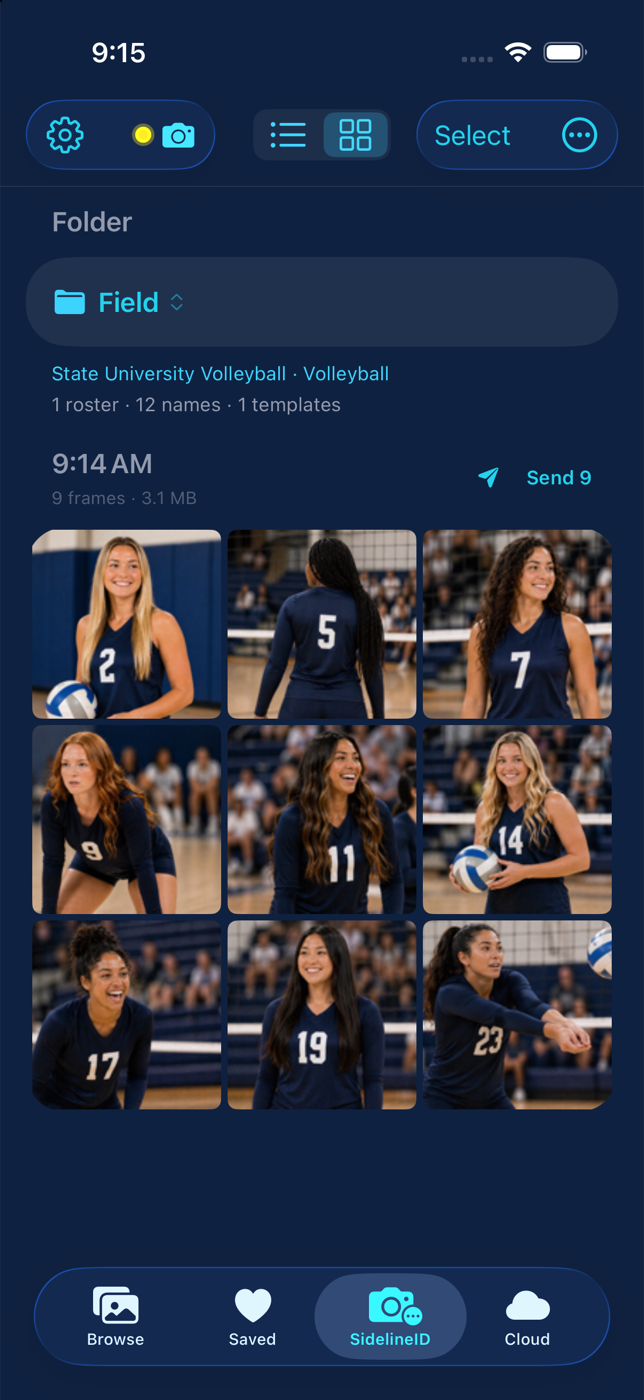
SidelineID is GalleryID Desktop on your phone at the game: the camera sends to the phone, CaptionID names the athlete from the roster, and the named file goes out from the sideline. Same rosters, same templates, same writer as the desktop.
The camera joins your phone’s hotspot and sends each frame as it’s taken. The roster from Desktop is already on the phone. Type a name, a number or a code, and one press writes the athlete and the full caption line from your template. Then send: FTP or SFTP to the wire, to Desktop’s inbox, to Photos, or to a share.
Halftime is enough. The named files are out before you’re back at the laptop, and the rest of the game waits in the same folder.
Names write to the file before it leaves the phone.


Included with GalleryID Desktop. How SidelineID works →
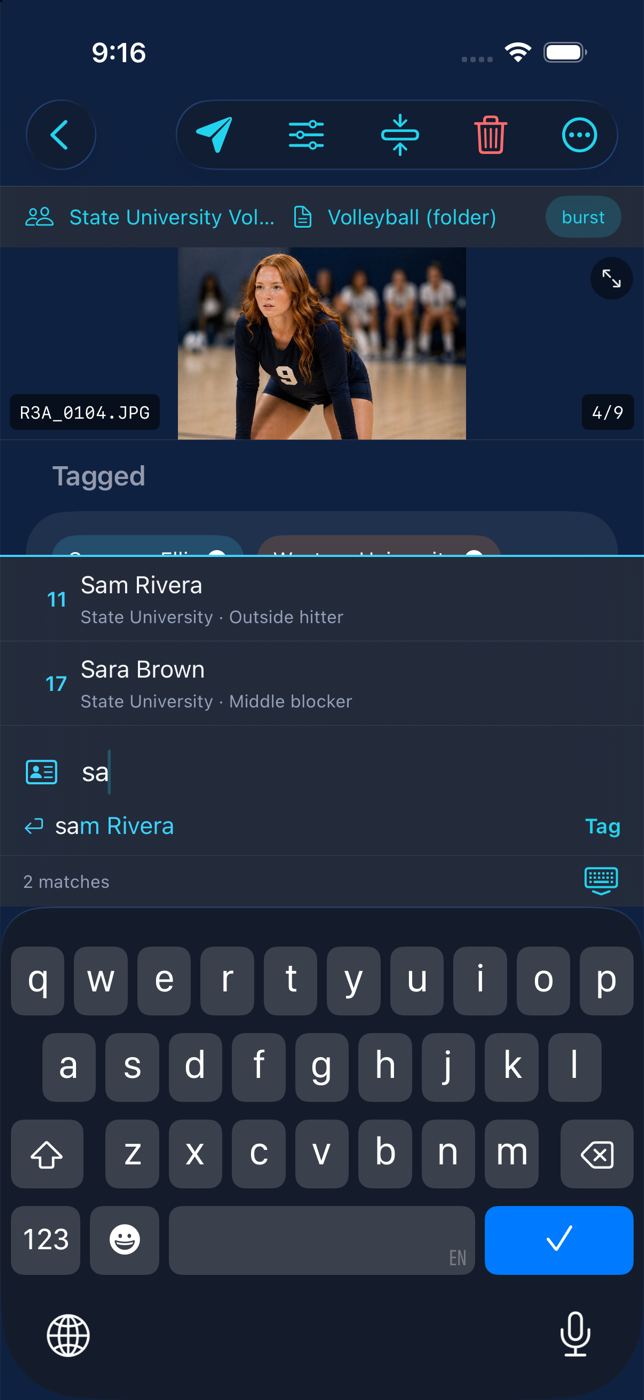
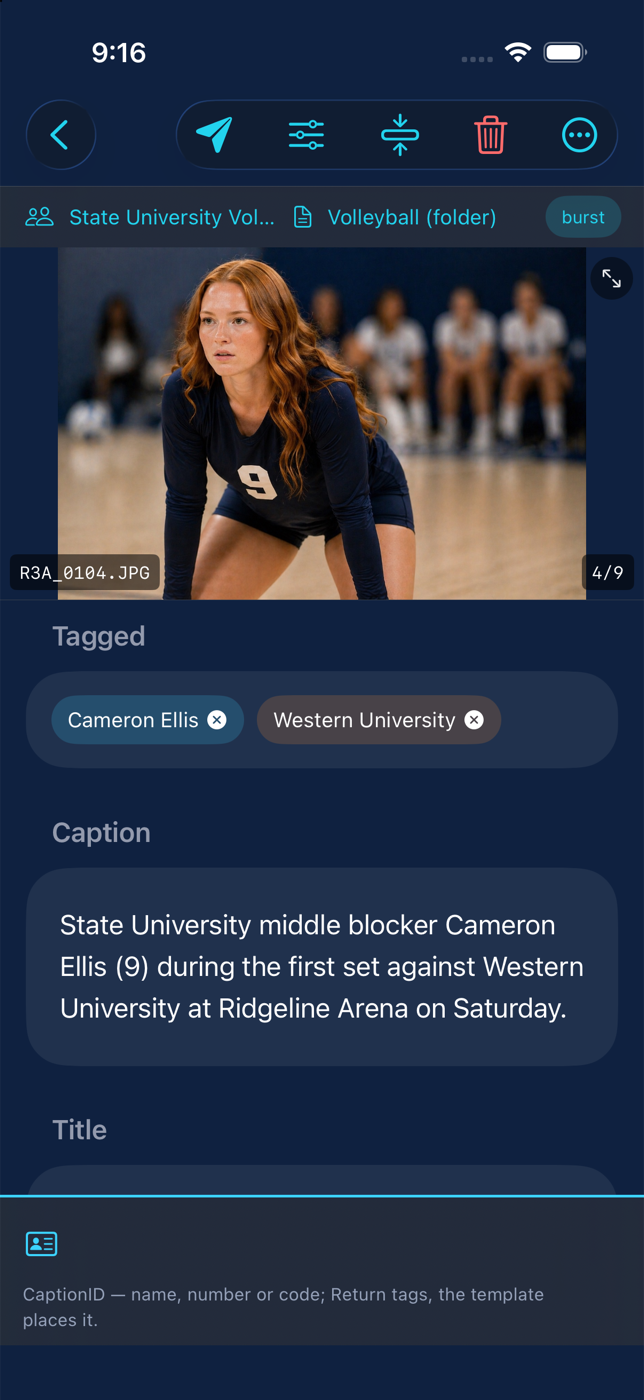
Name them yourself, or let MatchID name them.
A roster gets you moving. Headshots make it fly.
No headshots? One press does it.
Type the player once and the fields fill themselves, the name and the full caption line together, with no separate long form to enter. Prefer keystrokes? Code replacement works here too, and the Roster Library pulls a name by jersey number and team in two keystrokes.
Rosters bind to the folder, so the next event opens with the right one already loaded. No clearing out last season’s saved rosters mid-year.
The presses start happening for you.
Faces match against the headshots you indexed on your own machine, and jersey numbers fill in when the face is not legible. The confidence threshold you set decides what gets written without you looking at it, and anything below the line lands in the review queue instead of being guessed at.
Confirmed matches can be added as extra reference photos, giving MatchID more angles of each athlete so the next event matches better.
Not sure who that is? Ask.
You know the moment. The number is hidden, the player could be one of two who look alike from across the field, and you’re scrolling back through the take to narrow it down. It happens on teams you cover often.
Click Who Is This and MatchID checks that one photo against the headshots scoped to the folder and hands you its best match. You confirm and keep moving.
See the full walkthrough →Names are confirmed. Never guessed.
A name is written one of two ways: you confirm it, or it clears a confidence threshold you set yourself. Nothing in between, and nothing guessed at.
Tag from the roster and you are the first and last word on it. Let MatchID find it and anything uncertain waits in the review queue for your click.
Review is worth a pass even when the match is right, because being correct about who is in the frame is not the same as deciding who belongs in the delivery. Not everyone in the frame does, and most photographers caption in that same pass, right in the queue.
Desktop speeds up review and captioning. The decisions stay yours.
One app, start to delivery.
Identify
- Facial recognition trained on sports photography
- Jersey numbers when the face is not visible
- You set the confidence threshold
Roster tagging
- One press writes the name and the long form
- Over 18,000 rosters built in: NCAA D1, D2, D3 and pro
- Bound to the folder, subfolders inherit
Metadata
- IPTC and XMP, including Persons Shown
- Templates at app, org and folder level
- Find and replace across a folder
Ingest
- Card detection and saved profiles
- Metadata written during the copy
- Token rename and folder patterns
Cull
- Focus check flags blur and soft focus
- Star ratings, color labels and filters
- RAW browses from embedded previews
Edit
- Histogram, tone curve, clarity and texture
- White balance eyedropper, before and after
- Non-destructive, copy and paste between photos
Deliver
- FTP and FTPS with watermarking
- ZIP export with sidecars
- Output sharpening, names inside the files
Catalog
- Whole drives indexed, browsable offline
- Search by name, keyword or filename
- iPhone and Android apps: the catalog in your pocket, and SidelineID captioning on the phone as the camera sends
Voice memos
- In-camera memos transcribed on your machine
- Numbers and names resolved against the roster
- Suggestions you confirm, nothing tagged for you
Coming from Photo Mechanic?
Desktop covers the ingest, culling, ratings and IPTC work you already know, and code replacement values still run here. What it adds is facial recognition, jersey numbers, rosters that follow the folder, and one-click tagging with no file to maintain. There is a full side-by-side if you want the detail: GalleryID Desktop vs Photo Mechanic → If you owned Photo Mechanic Plus, the catalog question has its own page: after Photo Mechanic Plus →
In wire work, speed and accuracy win. The first photos on the wire are the ones that get used, and the miscaptioned ones are the ones that get remembered. Desktop was built for both sides of that.
Off the card and ready to work.
Ingest was rebuilt so the card lands and you can start editing sooner. The work happens once, while the file is being written, instead of twice.
Measured: 15 seconds per 1,000 photos copied.
21 to 27 with metadata written to all of them.
Four runs on two Macs; the largest 9,662 files and 101.92 GB from a CFexpress card, copied in 2:24 and fully captioned in 3:23 to 4:20. Desktop 1.0.131, figures from the application log. Results vary with hardware, card and file type.
Written during the copy
- Metadata is written to the file as the file is written
- No second pass that re-reads and rebuilds the photo
- The copy runs across a pool of workers, not one file at a time
Wire-safe on the way in
- XMP written as the primary, with the legacy IPTC-IIM mirror
- Agency tooling and wire services still read IIM on JPEGs
- Token rename, folder patterns and per-folder numbering
Careful where it matters
- A file that already carries its own metadata block takes the safe path
- Anything the fast writer will not handle falls back rather than guessing
- Nothing is dropped to save time
MatchID is not part of ingest
Importing copies, renames and stamps your files. Nothing analyses the pictures while the card comes across. MatchID is a step you run yourself, on a folder or a selection, whenever you are ready, which means you can cull first and identify only the frames you kept.
Cull, edit, catalog, roster.
The parts of the job that happen between the card and the wire.
Cull from previews that already exist
Paging through a take loads from previews written during the ingest, so nothing decodes a full-size file on a keypress. RAW pages through the JPEG preview your camera embeds in each file, and either way the next frame is just there.
Focus check does the squinting for you. It scores blur across the frame and sharpness on the faces that are actually the subject, not the spectator behind them, at four sensitivity levels. It starts on its own after the card ejects, the photos stay available the whole time it runs, and flagged frames are marked, never hidden or deleted.
Cull first. Run MatchID on the keepers.
Enough editor to make deadline
A live histogram with clipping marks. Exposure, contrast, highlights, shadows, whites and blacks, plus a tone curve when the sliders aren’t enough. Click a grey to set white balance. Clarity and texture for the frames that need bite. Hold the backslash key to see where you started, and copy the edits off one frame onto the next.
Nothing here touches the original. Raw developing still belongs to Lightroom or Capture One. This is the pass you do at the venue.
Your archive, browsable with the drives unplugged
Index whole drives into an offline-browsable archive. Browse and search by name, keyword or filename without mounting a single disk, and export HD previews or originals with people, keywords and capture date in the files.
The Catalog reads the names and keywords already in your files, including years of tagging done in other software, so the archive is searchable the day you index it. Removing something from it never touches the source. The GalleryID Desktop app for iPhone and Android puts the catalog in your pocket, synced over your own wifi only, and SidelineID captions on the phone at the game.
Tagging without the PDF
Over 18,000 team rosters and over 470,000 athletes, already loaded: NCAA Division I, II and III, with the D2 and D3 coverage running 90 sports deep, plus ten pro leagues. Auto-synced inside the app. Pull a name by jersey number and team in two keystrokes.
Other sports work the moment you load your own roster. The Library list is convenience, not a limit.
See the Roster Library →$20/mo or $200/yr. Two computers included.
One price, one product, no feature tiers. Five machines or more, there’s a team price.
Or $200 a year. One subscription covers two computers, so the laptop you travel with and the machine at home are both covered. On-device MatchID, the built-in Roster Library, IPTC and XMP metadata, ingest, culling, editing, the Catalog and delivery are all included.
- Nothing charged per photo and no AI credits
- Identification is unmetered because it runs on your machine
- New camera formats and new OS versions included
Five devices or more, billed annually. One license key activates them all. You name each machine with who uses it, release the one that sat in a bag all summer, and add devices mid-season at a prorated price on the same renewal. A newsroom or athletic department can hand the device list to its Cloud org admins; billing stays put.
- Same app, same features, nothing per photo
- A device console on your account page: label, release, and a report of machines that haven’t checked in
- Nothing is uploaded from any of them
A 14-day free trial with a card on file. There is no free plan.
Want the season searchable after delivery?
That is GalleryID Cloud: a hosted archive you search by athlete name, with galleries, share links and a download store, from $20/mo for 200 GB. Same identification engine, independent subscription, and neither product requires the other. Sign in to Cloud from inside Desktop to pull indexed headshots down or send named photos up.
Explore GalleryID Cloud →The things people ask first.
What is MatchID?
+
MatchID is GalleryID’s facial recognition, trained on sports photography rather than on ordinary photos. In Desktop it runs locally against headshots you index on your own computer, and it exists to accelerate the one-press tagging: the roster buttons you would press yourself get pressed for you, with jersey numbers read as a second signal. Helmets obstruct the face, and camera angles and lighting can reduce how well it performs, so matches it is not sure about wait in the review queue for your click. Because it was built for the hardest conditions in photography, the easier ones are covered too.
Do my photos get uploaded anywhere?
+
Everything runs local. There is nothing to upload, and we store nothing. The photos, the headshots you index and the face data all stay on your computer, with no cloud quota. Delivery is yours to choose: FTP out, hand off a drive, or publish to GalleryID Cloud when you want a hosted archive.
Does facial recognition actually work on sports photos?
+
The recognition built into consumer photo apps struggles here, because those models learned from photos where people face the camera. Action photography is the opposite: motion blur, heads turned away, athletes at distance, helmets. MatchID was trained on a large archive of sports photography instead, and reads jersey numbers when there is no face to read. It will not name everything on the first pass. Anything it is unsure of lands in a review queue where one click from the roster finishes it.
Is GalleryID Desktop an alternative to Photo Mechanic, Sideline Captions or digiKam?
+
Yes, and each comparison has its own page. It is a Photo Mechanic alternative for sports photographers who caption on deadline: the same ingest, cull, IPTC and FTP work, with ingest measured at about 15 seconds per 1,000 photos copied, your code replacement values still working, and then more of the job in the same app, starting with the name coming from a roster bound to the folder instead of a code file. It is a Sideline Captions alternative for photographers who do not want a preview of each frame sent to an AI service, who need Windows or an older Mac, or who want facial recognition beside jersey numbers and voice notes. It is a digiKam alternative for the tagging and delivery half of sports photography, where digiKam is a free general photo manager whose facial recognition learns from the faces you confirm and GalleryID Desktop starts from the team roster. For raw development and colour grading, pair it with Lightroom or Capture One; the names it writes show up in both.
Can GalleryID Desktop replace Photo Mechanic?
+
Yes. Desktop covers ingest, culling, ratings, tagging, captioning, and FTP and ZIP delivery, so it carries the whole workflow, and for most sports photographers that’s the point of switching. Your code replacement values run here as they are. And GalleryID doesn’t lock your metadata in: names write to the file in XMP and IPTC metadata, so the names go wherever the file goes. Send a photo to someone on Photo Mechanic and the names are there when they open it.
How fast is ingest, and does MatchID slow it down?
+
About 15 seconds per 1,000 photos copied, measured across four runs on two Macs at 14.9, 14.9, 15.6 and 16.9 seconds per 1,000. With metadata written to all of them it is 21 to 27 seconds per 1,000. The largest run was 9,662 files and 101.92 GB: copied in 2 minutes 24 seconds, and copied and captioned in 3 minutes 23 seconds to 4 minutes 20 seconds across three runs, with no file failing to take its metadata. Figures are read from the application log, Desktop 1.0.131. MatchID cannot slow ingest down because it only runs when you trigger it, never during a copy. Results vary with hardware, card and file type.
Does GalleryID Desktop support RAW files?
+
Yes, end to end. Ingest, culling, ratings, tagging, captioning and delivery all work on 15 RAW formats: CR2, CR3, NEF, NRW, ARW, SR2, RAF, ORF, RW2, DNG, PEF, SRW, X3F, IIQ and 3FR. Culling pages through the full-size JPEG preview your camera embeds in each RAW file, so nothing decodes sensor data on a keypress and browsing stays instant. The one feature that stays JPEG-side is the Edit tab. Raw developing belongs to Lightroom and Capture One; the files themselves are fully supported here.
I used Photo Mechanic Plus. What replaces the catalog?
+
GalleryID Desktop includes a catalog of its own, called the Catalog. It indexes whole drives into an offline archive you can browse and search by name, keyword or filename with the drives unplugged. Point it at the same drives and it takes over that role directly. Your years of tagging carry over automatically, because the captions, keywords and names were written to IPTC and XMP inside the files themselves, and the Catalog reads what is already there. No export, no migration tool. Removing an item from the Catalog never touches the source file.
What if I do not have headshots for a team?
+
Use the Roster Library instead. Click a player and the name goes to the fields you chose. The built-in library holds over 18,000 team rosters and over 470,000 athletes: NCAA Division I, II and III (including 649 D2 and D3 schools across 62 conferences and 90 sponsored sports), plus ten professional leagues (NFL, NBA, WNBA, MLB, NHL, MLS, NWSL, Liga MX, PGA and LPGA) and tournament squads for the 2026 FIFA World Cup and Leagues Cup. You can also build a roster in the app, upload your own as .xlsx, .xls, .csv, .tsv or .txt, or upload the code replacement file you already use in other captioning software. It works here as is.
What about sports that are not in the Roster Library?
+
Identification works for any sport today. It is driven by your roster and your headshots, not by a fixed list, so lacrosse, soccer, volleyball and anything else work the moment you load a roster. The built-in Roster Library is a convenience for the leagues we curate, and it grows over time.
Do I have to switch rosters when I change events?
+
No. Rosters bind to a folder. Open a different event and the right roster is already loaded, and subfolders inherit it unless you say otherwise.
Why is there a review queue?
+
Because names are confirmed, never guessed. A name is written one of two ways: you confirm it, or it clears a confidence threshold you set yourself. Tag it from the roster and you are the first and last word on it. Let MatchID find it and anything uncertain waits in the queue for your click. Review is worth a pass even when the match is right, because being correct about who is in the frame isn’t the same as deciding who belongs in the delivery. Not everyone in the frame does. The queue speeds up review and captioning. It doesn’t replace the need for them.
Which fields do the names get written to?
+
Wherever you put the tokens. Your template holds a token for the name and a token for the caption line, and you place them in the fields you want filled: the caption, Persons Shown, keywords, headline, one field or several. Each press writes to exactly the fields you mapped, nothing else. Names write to the file in XMP and IPTC metadata, including Persons Shown and Personality, so they read wherever the file goes next, in any program that reads metadata, even after the file has left your machine.
Is there a per-photo or AI credit charge?
+
No. Identification runs on your machine and is unmetered. $20/mo or $200/yr covers two computers, with a 14-day free trial. Five or more machines? Desktop Teams is $90 per device per year, billed annually, with a device console on your account page to name and release them.
Why isn’t there a perpetual license?
+
Because a perpetual license is perpetual for the camera and computer you owned the day you bought it. The typical policy in this category includes about a year of free updates; after that, the software keeps working only if your gear and OS stand still. Buy a new body and its RAW files may not open. Update your OS and the app may break, prompting a paid upgrade to the next version. GalleryID Desktop is $200/yr and always current: new camera formats, new OS versions, new features, no repurchase ladder. The subscription isn’t a payment plan. It’s the update policy.
Does it run on Windows?
+
Yes. macOS 12+ and Windows 10/11.
Names in the file.
Nothing in the cloud.
14 days free · $20/month, two computers included · Teams from $90 per device per year