Billing and your account
Manage your Desktop license and devices
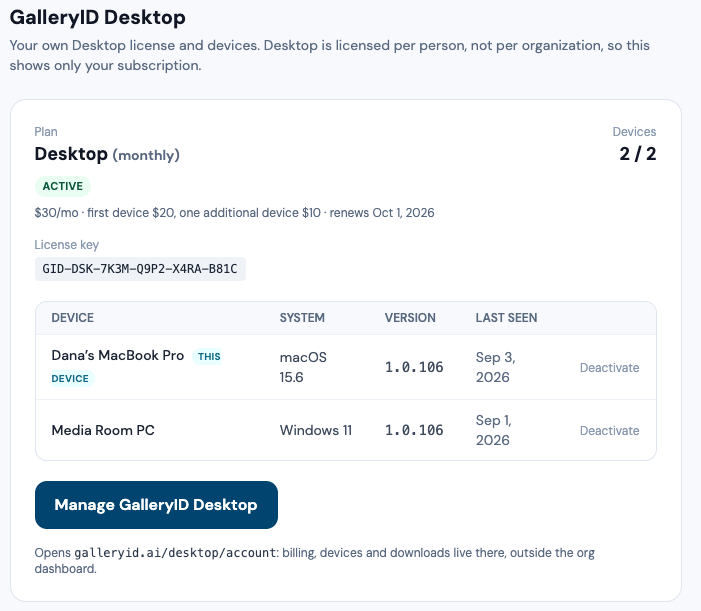
Desktop is licensed per person, not per organization, so this tab shows the signed-in user's own Desktop subscription and devices and never anyone else's, even for org admins.
If you do not have Desktop, the tab explains what it does and where to start a trial.
Desktop teams managed by your org
A Desktop team plan (five or more computers) is bought by one person, and that person can let a Cloud org manage it from this tab. When they have, org admins see the team's seats here: invite a person by email, set how many computers their key may run, resend a key, or release a seat. What the team has shared (rosters, code sets, metadata templates) is listed too, with Lock and Remove. Billing stays with the purchaser, and the switch lives on their Desktop account page, not here.
Where Desktop lives on the site
| Page | What it is for |
|---|---|
| galleryid.ai/desktop | The product page: what Desktop does, the two-computer price, the trial. |
| galleryid.ai/desktop/download | Installers for macOS and Windows. |
| galleryid.ai/desktop/account | Your license, devices, billing and cancellation. Manage GalleryID Desktop on this tab opens it. |
| galleryid.ai/desktop/help | The Desktop guide, separate from this Cloud help. Its Teams article covers personal keys and sharing. |