Galleries and photos
Find your way around the dashboard
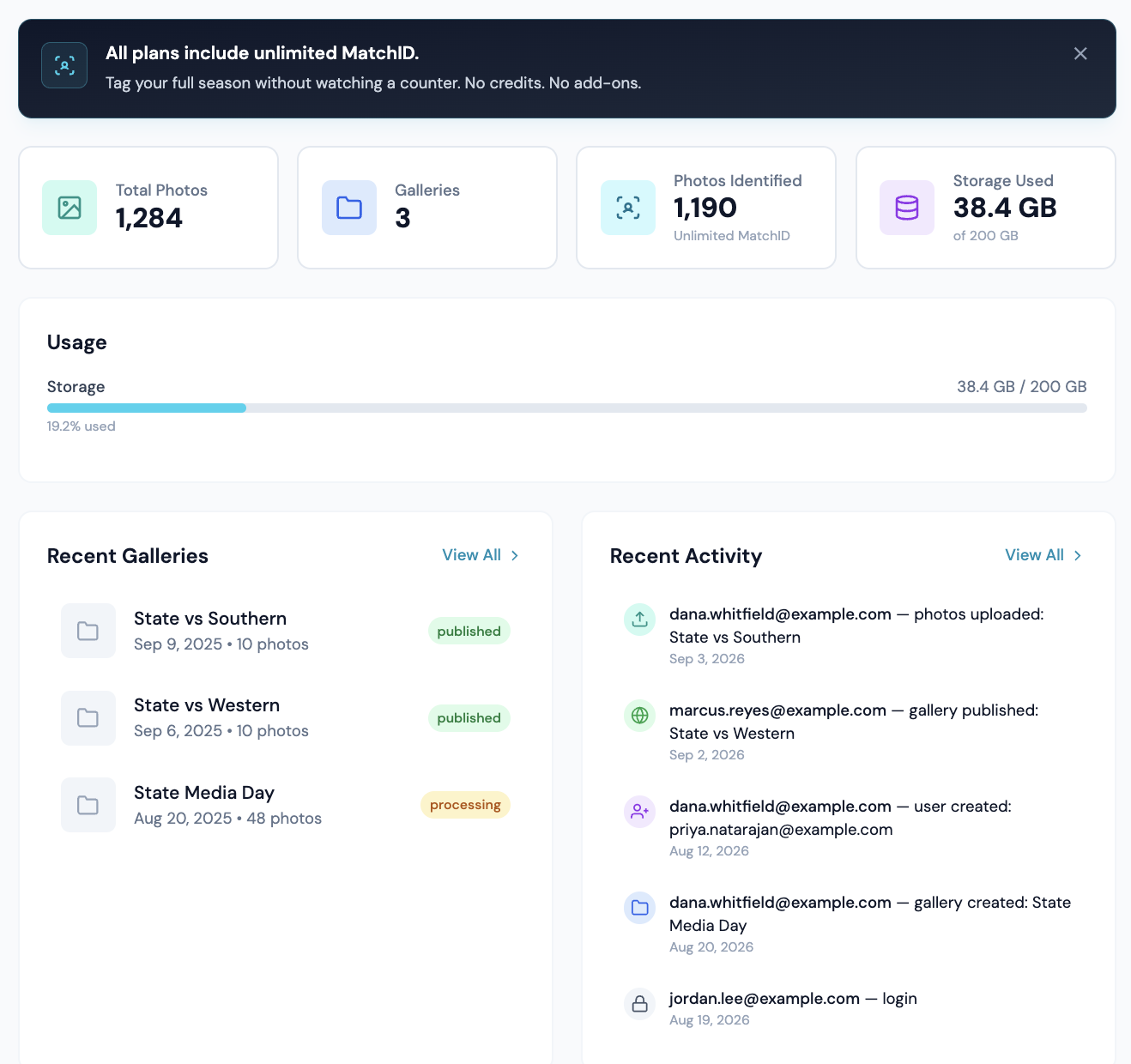
Overview is where the dashboard opens. It answers two questions: how much is in the account, and what still needs setting up.
Three ways to get names on photos
The getting-started card shows three paths. They are separate, and only the first one is needed to upload and share.
1 · Upload and share
Create a gallery, drop photos in, send a share link. No roster, no headshots.
Uploading guide →2 · Names from a roster
CaptionID tags athletes from a roster bound to the gallery. Works with no headshots. The name is written to the file's metadata on download.
Shortcode rosters →3 · Names automatically (MatchID)
MatchID only matches faces against headshots you've indexed. Until then uploads process normally and no names are added on their own.
Index headshots →What the four numbers count
| Card | What it actually counts |
|---|---|
| Total Photos | The sum of each gallery’s photo counter, not a live count of photo records. Clicking it opens Photos. |
| Galleries | An exact count of galleries in the organization. Clicking it opens the gallery browser. |
| MatchID Approved | Photos carrying an approved match, with a ring showing what share of your matchable photos that is. Clicking it opens the breakdown below. On a free plan the card reads MatchID and stays blank, because MatchID is a paid feature. |
| Storage Used | Storage against the plan limit, counted in decimal GB and TB so the number agrees with the plan name on your invoice. |
The MatchID breakdown
Clicking the card opens five rows that add up to Total Photos. Each one is a different answer to "why doesn't this photo have a name on it".
| Row | What it means |
|---|---|
| Approved | Confirmed in review, or cleared the confidence threshold your organization set. These names write to the file on download. |
| Pending review | Matched below your auto-approve threshold, waiting on a yes or no. |
| Faces found, no match | A face was detected and nobody in your indexed roster came close. Usually an opposing player, a coach, or an athlete with no headshot indexed yet. |
| No face in frame | Stadium wides, ball details, an empty field. Nothing to match against. |
| MatchID hasn't run | No roster was bound to the gallery, processing was switched off at upload, or the file is a format MatchID cannot read. |
Why the percentage is not out of your whole library
The ring divides by matchable photos, which means approved plus pending plus faces-found-no-match. Photos with no face in them, and photos MatchID has not run on, are left out of both halves of that fraction.
It matters most on a large account that is still working through its back catalogue. An organization holding 170,000 photos where MatchID has run on 4,500 of them sees a percentage in the high fifties, which is how facial recognition is performing on the photos it has actually seen. Dividing by the whole library would have shown about 1.5%, which says nothing about accuracy and everything about how much is still queued.
The same reasoning keeps a ball detail out of the maths. A frame with no face in it is not a MatchID miss, so counting it as one would make a gallery of wides and details look like a failure.
Storage warnings
- •At 90% an amber banner appears and uploads still work.
- •Uploads are turned away at about 105%. Existing galleries stay available and downloadable the whole time.
- •A red banner with a countdown means the account is over the limit on a closed or downgraded plan. It names the date by which to upgrade or download.
Recent Activity
Five entries by default, and View All loads up to a hundred. Repeat entries of the same kind within two minutes are collapsed into one line, so deleting a gallery of 200 photos reads as one event rather than 200.